Service pages and location pages each have important roles in your local SEO strategy. However, there are key differences between them that you should know if you want to dominate the Google search results for local customers.
In this post, we’ll compare service pages against location pages to see which has a greater impact on your local search rankings. I’ll also share actionable tips you can use to optimize both types of pages.
What Are Service Pages?
Service pages are centered around 1 service that your business provides such as “emergency plumbing” or “HVAC repair.” The service itself doesn’t have a location tied to it.
These types of pages are ideal for ranking for broader service-centric queries with high commercial intent. Plus, they allow you to showcase your expertise and build trust with detailed descriptions of your service.
Optimize with informational content: your services (your process, price ranges), FAQs, and reviews. Proper headings (H1: Emergency Plumbing Services) and include service markup for rich snippets.
What are Location Pages?
Location pages are designed to rank for geo-targeted queries such as “plumber near me” or “plumber in Denver.” They’re built to tell searchers “where you serve.” These pages typically contain extra information about each city you offer services in, like your service area boundaries, a map, and common problems homes in that city might face. Answer the question: Where do you serve? Location pages help you rank for the local pack by showing Google you’re relevant for local searches.
Location pages should include embedded Google Maps, unique content about each location you serve (it could be as simple as “Denver experiences harsh winters which require special attention to frozen pipes”), and correct NAP information. Try to get each location page between 500-1000 words to avoid publishing thin content.
Major Differences in Intention
Service Pages: Answers the question “what do you do?” Service pages rank for national/mainstream queries.
Location Pages: Answers the question “where do you serve?” Ideal for Service Area Businesses (SABs) that want to market to new areas.
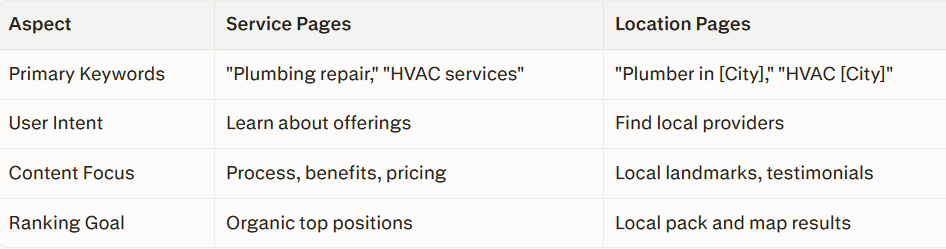
service pages help your site build broad authority, while location pages zero in on getting you noticed by nearby customers.
SEO Optimization Strategies
You need fresh, unique content for both, not just a copy-paste job with city names switched out. Service pages should link to your different locations and show off things like video demos or before-and-after galleries. For your location pages, focus on things like local schema markup, click-to-call buttons, and FAQs that answer city-specific questions.
- When writing titles, keep it sharp and searchable: “Plumbing Services in Denver | Fast Response” fits under 60 characters.
- Meta descriptions? Quick and direct: “24/7 Denver plumbers serving metro areas—book now for same-day fixes.”
- Build smart internal links: your service pages send visitors over to locations, and location pages loop back to your core services.
- Since most local searches—about 70%—happen on phones, your site has to load quickly and have buttons that are easy to tap.
Impact on Local Rankings
Location pages usually win out for local rankings because Google puts a lot of weight on proximity in map pack results. These pages use NAP (name, address, phone), reviews, and geo-keywords to pop up for “near me” searches. Service pages help by drawing wider audiences, but if you don’t build smart location pages, your service area business misses out on the hyper-local crowd.
The numbers back it up: strong, original location pages can boost local pack appearances by 40%, especially if you add tips that show your city expertise (“Best paints for coastal humidity” is a great example). But don’t overlook your service pages—when they’re strong, your site’s domain authority rises, making everything rank higher.
Real-World Examples
Take a Denver plumber. Their service page spells out “emergency repairs” with steps, pricing, and process—ranking for “emergency plumber” queries. Their Denver location page turns local, with testimonials from Aurora residents, a neighborhood map, and winter prep advice. That combo can land the top spot in the local pack.
In Austin, HVAC companies crank up location pages with “AC repair Austin,” dropping in maps and shoutouts to local partners—like nearby realtors. That local touch drives twice as many leads compared to generic service pages.
A winning location page uses bold calls to action and real local proof—think standout testimonials or coverage maps.
When to Prioritize Each
Running across several towns? Build a separate location page for each one. If you’re focused on just a few spots, service pages should show off your expertise and anchor your site. Best of both worlds: set up a handful of core service pages, then link out to a bunch of location pages.
Track what works using Google Search Console. Look at “service + city” keywords versus plain service ones. Update your pages every few months with fresh reviews and city tips.
Common Mistakes to Avoid
Don’t recycle the same content—Google hates it, and so will customers. Give each city its own flavor. Don’t forget clear calls to action: “Call Now” buttons on location pages and quick quote forms for services. Always use schema markup for those rich results. And don’t go overboard with keywords—too many and you start looking like spam.
Summary
Location pages usually rank best locally because of their geo-focus, but service pages boost your overall site authority. Use both, and you’ll cover every step of the customer journey, from awareness to conversion.
Ready for next steps? Audit your site: list your services and main cities, and start building or updating those pages with these tips. Reach out for a free local ranking audit—let’s help you dominate your market.