

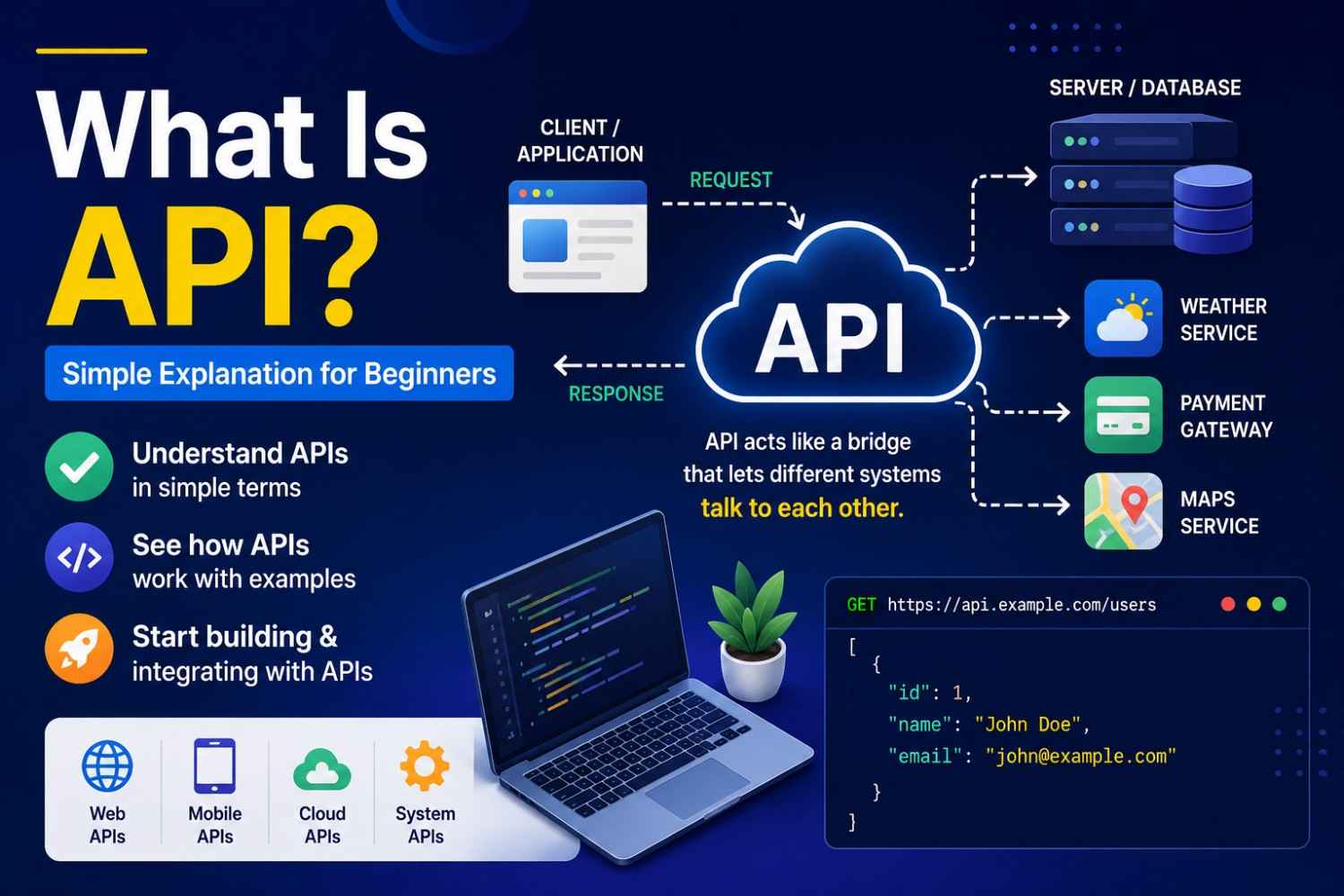
If you’re learning web dev, mobile apps, or anything that involves screens and data, you’ve probably run into “API” a lot. APIs are everywhere, like login bits, payment things, weather apps even social media hookups and those “share to your profile” buttons.
But still, what is an API really, and why does everyone keep talking about it?
In this easy guide, you’ll get the gist of:
* What an API is, in plain language
* How APIs actually work (not just the definition)
* Real examples you might recognize
* Different kinds of APIs
* Why developers and businesses use them
* A few simple API request examples
By the time you finish, you should understand how separate software systems can talk to each other without chaos.
What Is an API?
API stands for:
Application Programming Interface
Yeah ok, the name sounds kinda serious. But the idea itself is pretty straightforward.
An API is like a courier or messenger between two applications.
One piece of software asks another piece of software for data, or for a service.
Simple Real-Life Example
Picture going to a restaurant.
* You order
* The waiter takes it to the kitchen
* The kitchen cooks it up
* The waiter brings the food back
In this setup:
| Real Life | API World |
|---|---|
| Customer | User/Application |
| Waiter | API |
| Kitchen | Server/Database |
| Food | Requested Data |
So basically, the API behaves like the waiter, it transports the request and then the response, between systems
Why APIs Matter
Modern apps rely on APIs a lot.
Without APIs:
* Apps would have a harder time talking to each other
* Integrations would be a pain
* People would end up rebuilding the same stuff from scratch
APIs help with:
* Saving development time
* Connecting systems faster
* Sharing data in a safer way
* Adding external services without going full rebuild mode
Real Examples of APIs
You probably use APIs daily, even if you never looked them up.
1. Weather Apps
Weather apps pull live conditions using weather service APIs.
2. Google Maps Integration
Websites call map APIs to show places and route directions.
3. Payment Gateways
Services like PayPal and Stripe use APIs for secure payments.
4. Social Login
“Login with Google” or “Login with Facebook” runs through APIs, behind the scenes.
5. Chat Applications
Messaging tools often use APIs for sending and receiving messages.
How APIs Work
APIs generally run via requests and responses.
Step-by-Step
Step 1: The Client Sends a Request
An application sends a request to an API.
Example:
GET /users
Step 2: The API Handles the Request
The API checks its server side and may query a database.
Step 3: The API Sends Back a Response
Then the API returns data.
Example:
[
{
"name": "John",
"email": "john@example.com"
}
]
Common API Methods
Many APIs use HTTP methods.
| Method | Purpose |
| GET | Retrieve data |
| POST | Create new data |
| PUT | Update data |
| DELETE | Remove data |
Example of a Simple API Request (JavaScript)
Here’s a beginner friendly example.
fetch('https://api.example.com/users')
.then(response => response.json())
.then(data => console.log(data));
What this does:
1. Sends a request to the API
2. Gets data back
3. Prints it out
Types of APIs
Different apps use different API styles, here are common ones.
1. Public APIs
Open for anyone to use.
Examples:
* Weather APIs
* Currency APIs
2. Private APIs
Used inside a company only.
Not meant for public access.
3. Partner APIs
Shared between partner businesses, usually with permissions.
4. REST APIs
One of the most common patterns today.
REST APIs tend to be:
* Fast
* Lightweight
* Simple to work with
Most modern web applications use REST, or at least something closely related.
What Is a REST API?
REST means:
Representational State Transfer
With REST APIs you typically use:
* URLs
* HTTP methods
* JSON payloads
Example:
GET https://api.example.com/products
That retrieves product info from the server.
What Is JSON?
Most APIs send their data using JSON.
JSON stands for:
JavaScript Object Notation
Example:
{
"product": "Laptop",
"price": 750
}
JSON is:
* Lightweight
* Easy to read
* Widely supported everywhere
Benefits of APIs
APIs give businesses and developers a bunch of advantages.
Faster Development
Instead of building every service from nothing, developers reuse existing systems.
Better Integration
Different platforms can communicate without awkward glue code.
Improved Scalability
More modular pieces mean easier growth and flexibility.
Enhanced User Experience
APIs enable live updates and dynamic content (so apps feel more responsive).
APIs in Modern Websites
Most modern websites use APIs for:
* Authentication
* Payments
* Notifications
* Chat features
* Analytics
* Social sharing
* AI integrations
Even “simple” marketing sites might still rely on multiple APIs
Common API Challenges
APIs are great, but they’re not perfect, there can be problems.
Security Risks
If an API isn’t protected properly, sensitive data can leak.
Rate Limits
Some APIs restrict how many calls you can make in a time window.
Dependency Issues
If a third-party API breaks, your app might suffer too.
Best Practices for Using APIs
Use Secure Authentication
Protect access using tokens or other auth methods.
Handle Errors Properly
Don’t assume every request succeeds. Plan for failures.
Optimize Requests
Avoid sending extra calls all the time to keep things quick.
APIs are one of the most important technologies behind modern websites and apps. They let different software systems talk to each other, share data, and enable advanced features in a fairly efficient way
Whether you are building
Websites
Mobile apps
SaaS platforms
Marketing tools
having an understanding of APIs will help you work more effectively with modern tech.
The good news is that APIs are actually far simpler than they first sound. After you get the hang of requests, responses, and that whole back and forth data exchange, the idea starts to feel a lot more straightforward.
Now that you understand API basics
Explore a free public API
Test API requests using Postman
Learn how REST APIs work
Try connecting an API to your website




