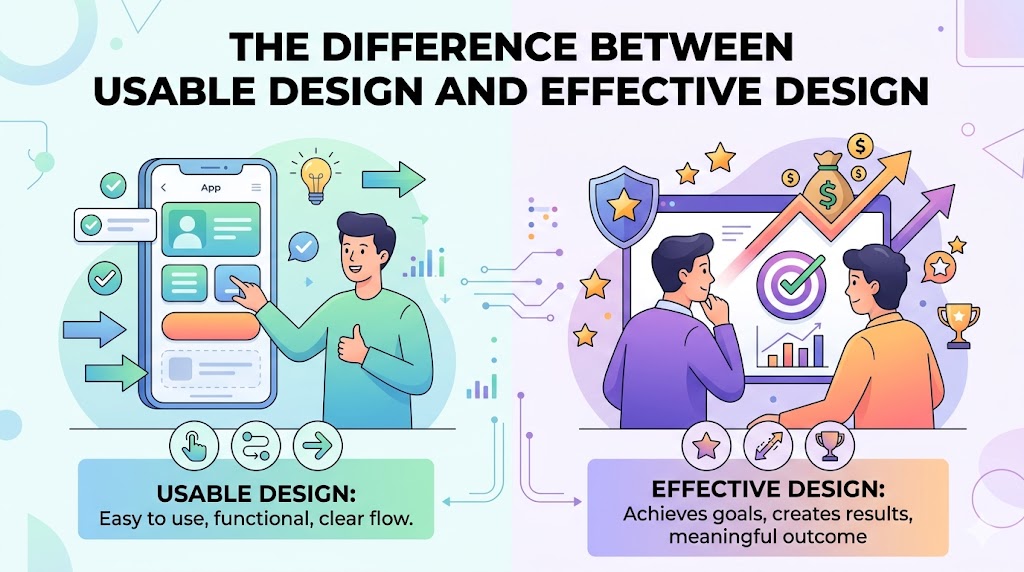
Even if your website looks good and works, it doesn’t mean it will deliver the desired result. There is an enormous distinction between designing a usable website and designing an effective website—and most companies often overlook this issue.
In this article, we will discuss the distinctions between usability and effectiveness, why they are important, and how good user experience design can help create a truly effective website.
What Is Usable Design?
Usable design focuses on one thing:
*Can users easily use the website?
A usable website is:
- Easy to navigate
- Simple to understand
- Accessible on different devices
- Free from confusion
Example of Usable Design:
- Clear menus
- Readable text
- Mobile responsiveness
- Logical page structure
* Users can complete tasks without frustration.
What Is Effective Design?
Effective design goes a step further.
*Does the design help achieve business goals?
A website can be usable but still ineffective if it:
- Doesn’t generate leads
- Fails to guide users toward action
- Doesn’t communicate value clearly
Effective design focuses on:
- Conversions
- User psychology
- Strategic calls-to-action
- Business outcomes
The Core Difference
Usable Design:
“Can users use it?”
Effective Design:
“Does it drive results?”
* The best websites do both.
Real-World Example
Imagine two websites:
Website A
- Clean layout
- Easy navigation
- Fast loading
But:
- Weak messaging
- Hidden CTA buttons
- No trust signals
* Usable? Yes.
* Effective? No.
Website B
- Clear value proposition
- Strong CTA
- Optimized conversion flow
But:
- Slightly more complex layout
* It may convert better despite being less “minimal.”
Why Businesses Often Get This Wrong
Many companies focus only on aesthetics.
Common mindset:
“If the site looks modern, it’s good.”
But users don’t convert because of visuals alone.
* They convert when:
- They understand the offer
- Trust the business
- Know what to do next
Step 1: Build for Clarity First
Clarity beats creativity.
Ask:
- Can users understand the page in 5 seconds?
- Is the CTA obvious?
- Is the messaging clear?
* Confused users never convert.
Step 2: Make Navigation Effortless
Good usability still matters.
Best practices:
- Simple menu structure
- Consistent layout
- Clear labels
Example:
<nav>
  <a href="/services">Services</a>
  <a href="/contact">Contact</a>
</nav>
* Users should never “search” for important pages.
Step 3: Design Around User Intent
Effective design understands psychology.
Example:
A visitor landing on a service page usually wants:
- Pricing
- Benefits
- Trust signals
- Contact options
* Your design should prioritize these immediately.
Step 4: Use Strong Call-to-Actions (CTAs)
A usable site without direction loses conversions.
Weak CTA:
“Learn More”
Strong CTA:
“Get a Free Consultation Today”
* Specific CTAs perform better.
Step 5: Reduce Friction
Every extra step reduces conversions.
Remove:
- Long forms
- Too many popups
- Unnecessary clicks
Example:
<button>Book Free Strategy Call</button>
* Simplicity improves effectiveness.
Step 6: Add Trust Signals
Trust is part of effective design.
Include:
- Testimonials
- Reviews
- Certifications
- Client logos
* Users need confidence before taking action.
Step 7: Optimize for Mobile UX
Most users browse on mobile.
Mobile priorities:
- Fast loading
- Large buttons
- Easy scrolling
- Click-to-call actions
* A usable desktop site means nothing if mobile UX fails.
Common Mistakes in Web Design
Mistake #1: Designing for Yourself
Users don’t think like designers.
Mistake #2: Prioritizing Animations Over Clarity
Fancy effects don’t equal conversions.
Mistake #3: Ignoring User Flow
Good design guides users naturally.
Effective Design Is Strategic
Great design combines:
- UX principles
- Psychology
- Marketing
- Business goals
* That’s what separates “pretty websites” from high-performing ones.
FAQ
What is the difference between usable and effective design?
Usable design focuses on ease of use, while effective design focuses on achieving business goals and conversions.
Can a website be usable but ineffective?
Yes. Many websites are easy to use but fail to generate leads or sales.
Which is more important: usability or effectiveness?
Both matter, but effectiveness ultimately determines business success.
Summary
The best websites don’t just look good—they perform.
Key takeaway:
- Usable design helps users navigate
- Effective design helps businesses grow
* Your goal should be to combine both into one seamless experience.
What Should You Do Next? (CTA)
Review your website today and ask:
- Is it easy to use?
- Does it clearly guide users toward action?
- Is it helping generate real results?
If the answer is “not really,” it may be time to rethink your design strategy.
Start building websites that are not just usable—but truly effective