

The time of AI being some future technology limited only to huge corporations is gone. Companies of all sizes and industries today are leveraging chatbots powered by artificial intelligence to offer better assistance to their clients, attract leads, and be available 24/7 to help visitors at any time. If you’re the owner of a WordPress site, getting yourself a chatbot is perhaps one of the best ways to improve UX and lessen your daily workload.
Regardless of whether you operate an online store, SaaS portal, education site, business portfolio, etc., AI chatbots can assist in answering questions, offering product suggestions, collecting data from users, or performing various other tasks related to customer support.
This article will show you the inner workings of AI-powered chatbots for WordPress, their significance, selection criteria, and deployment steps in order to ensure maximum effectiveness.
Why AI-Powered Chatbots Matter for WordPress Websites
The users of websites expect to get prompt replies. However, when such is not received, the majority of customers simply abandon the website.
AI chatbots are capable of helping to overcome this problem by providing:
- Around-the-clock customer support
- Prompt replies to any questions posed by the users
- Lead generation
- Decrease in customer service load
- Enhancement of customer engagement
- Better conversion rates
As opposed to the conventional scripted chatbots, AI chatbots can interpret natural language.
Example
Imagine a visitor lands on your WordPress website at midnight and asks:
“Which pricing plan is best for a small marketing agency?”
A traditional chatbot may fail if the exact question isn’t programmed.
An AI chatbot can analyze the intent and respond:
“For small marketing agencies, our Professional Plan is usually the best fit because it supports up to 10 team members and includes advanced reporting features.”
This creates a smoother customer experience and increases the likelihood of conversion.
How AI Chatbots Work on WordPress
Before implementation, it’s important to understand the basic workflow.
Step 1: User Asks a Question
The visitor enters a question through the chat widget.
Step 2: AI Processes the Request
The AI model analyzes the message using Natural Language Processing (NLP).
Step 3: Information Retrieval
The chatbot searches:
- Website content
- FAQs
- Knowledge bases
- Product documentation
- Custom training data
Step 4: Response Generation
The chatbot generates a conversational response and displays it instantly.
Simple Workflow Diagram
Visitor Question
        │
        ▼
 AI Chatbot Engine
        │
        ▼
 Content & Knowledge Base
        │
        ▼
 Intelligent Response
        │
        ▼
 Website Visitor
This process happens within seconds, creating a seamless interaction.
Benefits of AI-Powered WordPress Chatbots
Improve Customer Support
Visitors receive immediate answers without waiting for support agents.
Common Support Queries
- Pricing questions
- Product details
- Refund policies
- Shipping information
- Appointment scheduling
Generate More Leads
AI chatbots can qualify leads automatically by asking questions such as:
- What’s your budget?
- Which service are you interested in?
- How many employees does your company have?
The collected information can be sent directly to your CRM.
Increase Website Engagement
Interactive conversations keep visitors on your website longer, reducing bounce rates and increasing page interactions.
Reduce Operational Costs
Many repetitive support requests can be handled automatically, allowing your team to focus on higher-value activities.
Choosing the Right AI Chatbot for WordPress
Not every chatbot solution offers the same capabilities.
When evaluating options, consider the following features:
Natural Language Understanding
The chatbot should understand different ways users phrase questions.
Example
Users may ask:
- “How much does it cost?”
- “What are your prices?”
- “Can I see your pricing plans?”
A quality AI chatbot understands all three questions refer to pricing.
Knowledge Base Training
The chatbot should be able to learn from:
- Website pages
- PDFs
- FAQs
- Documentation
- Custom content
WordPress Integration
Look for solutions that provide:
- Easy installation
- Plugin support
- Customizable widgets
- Analytics dashboards
Lead Capture Features
The chatbot should support:
- Contact forms
- Email collection
- CRM integrations
- Meeting scheduling
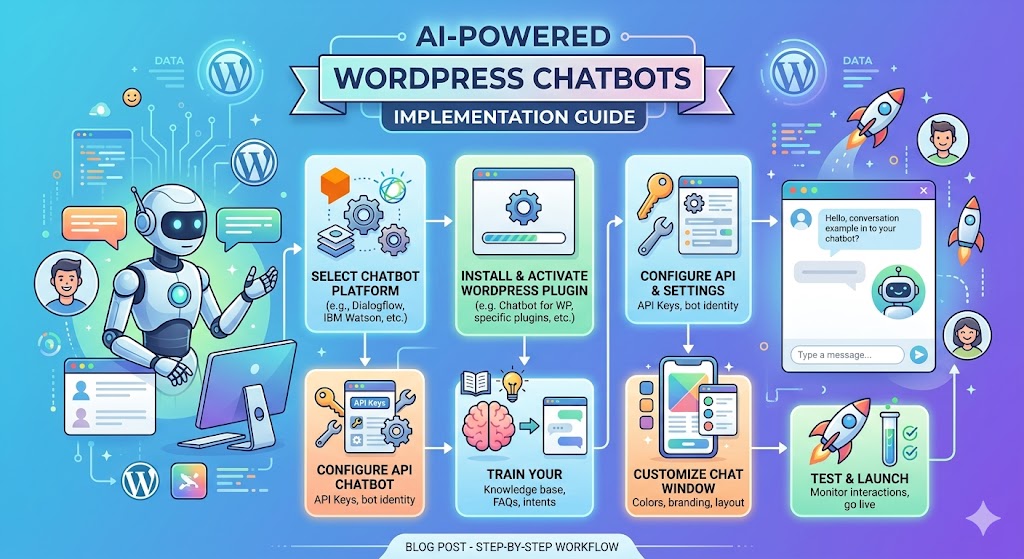
Step-by-Step Guide to Implement an AI Chatbot on WordPress
Step 1: Define Your Goals
Before installation, determine what success looks like.
Ask yourself:
- Do I want to reduce support tickets?
- Do I need more leads?
- Am I improving customer experience?
- Do I want to automate sales conversations?
Having clear objectives helps you configure the chatbot effectively.
Step 2: Audit Existing Website Content
An AI chatbot is only as effective as the information it can access.
Review your:
- Service pages
- Product descriptions
- FAQs
- Blog content
- Support documentation
Update outdated information before training the chatbot.
Step 3: Install the Chatbot Plugin
Most AI chatbot providers offer a WordPress plugin.
Typical Installation Process
- Log in to WordPress Admin.
- Navigate to Plugins → Add New.
- Search for the chatbot plugin.
- Click Install.
- Activate the plugin.
- Connect your chatbot account.
Screenshot Placeholder
+----------------------------------+
| WordPress Dashboard              |
|                                  |
| Plugins > Add New                |
| Search: AI Chatbot               |
|                                  |
| [Install] [Activate]             |
+----------------------------------+
Installation usually takes only a few minutes.
Step 4: Train the AI Chatbot
Training is one of the most important stages.
Provide:
- Website URLs
- Documentation
- FAQ pages
- Product catalogs
- Knowledge base articles
Example Training Sources
https://yourwebsite.com/about-us
https://yourwebsite.com/pricing
https://yourwebsite.com/faq
https://yourwebsite.com/services
The more relevant content you provide, the better the chatbot responses become.
Step 5: Configure Chatbot Personality
A chatbot should match your brand voice.
Professional Brand Example
“Hello! How can I assist you today?”
Friendly Brand Example
“Hi there 👋 What can I help you find today?”
Consistency improves customer trust and brand recognition.
Step 6: Set Up Lead Capture Workflows
Create automated conversations that collect visitor information.
Sample Lead Capture Flow
Visitor: I need help with SEO.

Bot: Great! Are you looking for local SEO,
eCommerce SEO, or enterprise SEO?

Visitor: Local SEO.

Bot: What's your business website?

Visitor: example.com

Bot: Thanks! Can I get your email so our
SEO specialist can contact you?
This process automatically qualifies leads before human involvement.
Step 7: Test Before Launch
Never launch a chatbot without testing.
Check:
- Accuracy of responses
- Mobile responsiveness
- Lead forms
- Conversation flows
- Escalation options
Test Questions
- What services do you offer?
- How much does it cost?
- How can I contact support?
- Do you offer refunds?
Identify weak responses and retrain the chatbot if necessary.
Advanced AI Chatbot Features Worth Implementing
Once the chatbot is running successfully, consider enabling advanced capabilities.
Multilingual Support
Global businesses benefit significantly from multilingual chatbots.
Supported languages often include:
- English
- Spanish
- French
- German
- Hindi
- Arabic
This expands customer reach without hiring multilingual support agents.
CRM Integration
Connect your chatbot with systems like:
- Salesforce
- HubSpot
- Zoho CRM
- Pipedrive
This ensures leads are automatically stored and tracked.
Appointment Booking
Allow users to schedule meetings directly through chat.
Benefits include:
- Faster scheduling
- Reduced friction
- Higher booking rates
Analytics and Reporting
Track metrics such as:
- Total conversations
- Engagement rate
- Lead conversion rate
- Resolution rate
- Customer satisfaction
Data-driven optimization improves chatbot performance over time.
Common Mistakes to Avoid
Many businesses fail to achieve chatbot success because they make avoidable mistakes.
Overcomplicating Conversations
Keep interactions simple and natural.
Using Outdated Training Data
Regularly update website content and chatbot knowledge sources.
Ignoring Human Escalation
Some issues require human support.
Always provide options such as:
- Contact forms
- Live chat handoff
- Support email
- Phone support
Not Monitoring Performance
Review chatbot conversations regularly to identify opportunities for improvement.
Real-World Example
Consider an online WordPress-based software company receiving 200 support inquiries daily.
Before implementing an AI chatbot:
- Average response time: 6 hours
- Support team workload: High
- Lead qualification: Manual
After implementation:
- Instant responses available 24/7
- Support tickets reduced significantly
- Automated lead qualification
- Increased customer satisfaction
This demonstrates how AI chatbots can create measurable business value beyond customer support.
SEO Benefits of AI-Powered Chatbots
Many website owners overlook the indirect SEO advantages of chatbots.
Benefits include:
- Lower bounce rates
- Increased dwell time
- Better user engagement
- Improved customer satisfaction
- Higher conversion signals
While chatbots are not a direct ranking factor, they help improve user experience metrics that often correlate with stronger search performance.
Future Trends in AI Chatbots for WordPress
The next generation of AI chatbots will become even more intelligent through:
- Voice interactions
- Personalized recommendations
- Predictive customer support
- Advanced sentiment analysis
- AI-powered sales assistance
Businesses that adopt these technologies early will gain a significant competitive advantage.
Conclusion
AI-powered WordPress chatbots have evolved from simple support tools into powerful business growth assets. They help organizations provide instant assistance, improve engagement, capture qualified leads, and reduce operational costs while delivering a better customer experience.
Successful implementation begins with clear goals, quality training data, thoughtful conversation design, and continuous optimization. By following the steps outlined in this guide, you can deploy a chatbot that not only answers questions but actively contributes to your marketing, sales, and customer support efforts.
Ready to Implement an AI Chatbot?
Start by identifying your most common customer questions, auditing your website content, and selecting an AI chatbot platform that integrates seamlessly with WordPress. The sooner you implement and optimize your chatbot strategy, the sooner you’ll begin seeing improvements in engagement, lead generation, and customer satisfaction.




