

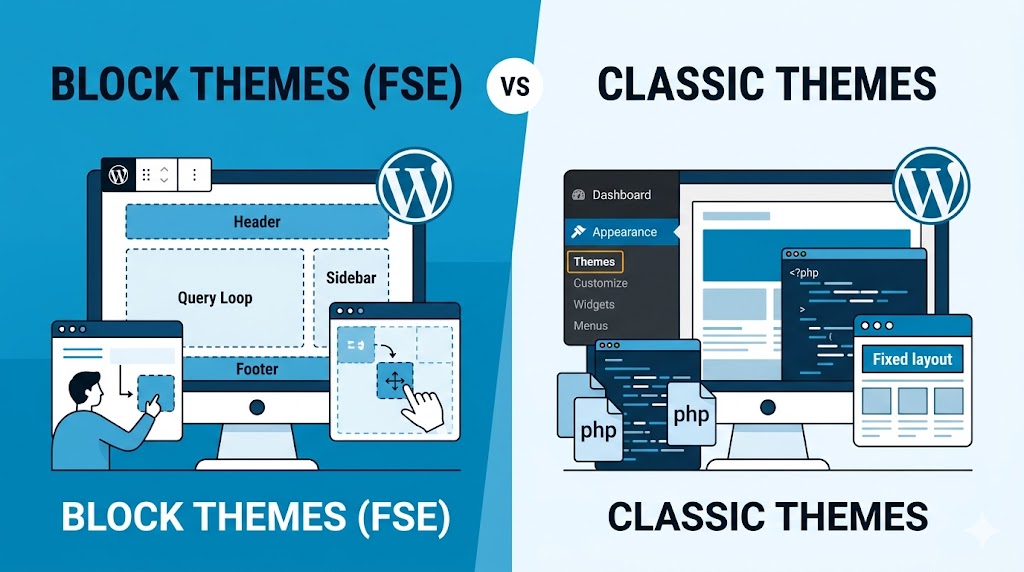
In case you’ve been building a WordPress site during the past several years, then most likely, you’ve already realized that WordPress themes became quite different from what used to be before. Once simple choice between free and premium themes has transformed into a decision between two distinct types: Block Themes and Classic Themes.
As FSE (Full Site Editing) becomes more advanced and WordPress actively develops its block-based ecosystem, some website owners begin to wonder whether it is finally time to shift away from classical themes.
There’s no simple answer to that question.
Despite numerous interesting prospects of Block Themes, Classic Themes continue being the best option for many businesses, agencies, and developers. Making a wrong choice might affect your productivity, your website performance, customizability, and even long-term plans.
In this guide, we will explain what distinguishes Block Themes from Classic ones, their pros and cons, use cases, and how to make the right decision when choosing an appropriate type of theme for your WordPress site in 2026.
What Is a WordPress Theme?
A WordPress theme controls your website’s:
- Layout
- Design
- Typography
- Header and footer structure
- Navigation appearance
- Overall user experience
Think of a theme as the framework that determines how your content is displayed.
For years, WordPress relied almost entirely on classic themes. However, the introduction of the Gutenberg editor and Full Site Editing created an entirely new category known as block themes.
What Are Classic Themes?
Classic themes are the traditional WordPress themes that have powered websites for more than a decade.
These themes typically use:
- PHP templates
- Theme customizers
- Widget areas
- Page builders
- Theme options panels
Most popular WordPress themes released before Full Site Editing belong to this category.
Common Examples
- Astra
- GeneratePress
- OceanWP
- Avada
- Divi
Classic themes remain extremely popular because they provide familiar workflows and strong compatibility with existing plugins.
What Are Block Themes?
Block themes are built specifically for the modern WordPress block editor.
Instead of relying heavily on PHP template files and customizer settings, block themes use blocks to control nearly every part of a website.
This includes:
- Headers
- Footers
- Templates
- Sidebars
- Navigation menus
- Page layouts
With a block theme, you can visually edit parts of your website that previously required code or theme settings.
Understanding Full Site Editing (FSE)
The biggest difference between block themes and classic themes is Full Site Editing.
Full Site Editing allows users to edit the entire website through the WordPress editor.
Instead of modifying settings in multiple locations, you can customize your site’s structure directly from a visual interface.
This means:
- Editing headers without code
- Designing footers visually
- Creating custom templates
- Building page layouts consistently
For beginners, this can be incredibly powerful.
For experienced developers, it can dramatically change workflows.
Advantages of Block Themes
1. Complete Visual Control
One of the biggest advantages of block themes is flexibility.
Instead of hunting through theme settings, you can visually modify:
- Headers
- Footers
- Layout structures
- Navigation sections
This creates a more intuitive experience.
For website owners who prefer visual editing, block themes are often easier to manage.
2. Fewer Third-Party Page Builders
Many classic theme users rely on page builders such as Elementor or WPBakery.
Block themes reduce this dependency.
The native WordPress editor can handle many design tasks without additional plugins.
This often results in:
- Faster websites
- Cleaner code
- Fewer plugin conflicts
3. Better Alignment with WordPress Future
WordPress development is increasingly focused on block-based workflows.
Most new feature releases prioritize Gutenberg and Full Site Editing.
Choosing block themes today often means aligning your website with future WordPress updates.
4. Consistent Editing Experience
Traditional WordPress websites sometimes feel fragmented.
You edit:
- Pages in one place
- Widgets elsewhere
- Menus elsewhere
- Theme settings somewhere else
Block themes create a more unified editing experience.
Everything happens inside a similar interface.
Advantages of Classic Themes
1. Familiar Workflow
Many developers and agencies have worked with classic themes for years.
Their workflows are established and efficient.
For businesses already using classic themes successfully, there may be little reason to switch immediately.
2. Better Plugin Compatibility
Thousands of plugins were originally built around classic WordPress architecture.
As a result, classic themes generally offer excellent compatibility.
This is especially important for:
- Membership websites
- Learning platforms
- Complex WooCommerce stores
- Enterprise websites
3. More Mature Ecosystem
Classic themes have benefited from years of development.
The ecosystem includes:
- Tutorials
- Community support
- Premium extensions
- Developer resources
This maturity makes troubleshooting easier.
4. Easier for Some Clients
Not every client wants advanced design flexibility.
Many simply want:
- Stable websites
- Predictable workflows
- Minimal learning requirements
Classic themes often provide this simplicity.
Example: Header Customization
Classic Theme Approach
You may customize the header through:
<?php get_header(); ?>
Then adjust settings through:
- Theme options
- Customizer settings
- Child theme modifications
Block Theme Approach
The header can be edited visually using blocks.
No PHP knowledge is required.
Users can:
- Move elements
- Change layouts
- Add buttons
- Modify navigation
directly inside the editor.
This is one of the biggest workflow differences.
Which Option Performs Better?
Performance depends more on implementation than theme type.
A poorly built block theme can be slower than a well-optimized classic theme.
Likewise:
- Excessive plugins
- Large images
- Heavy scripts
can impact performance regardless of theme choice.
That said, lightweight block themes often eliminate the need for extra page builders, which can improve speed.
Which Is Better for SEO?
Both theme types can perform exceptionally well for SEO.
Search engines care more about:
- Speed
- Mobile usability
- Accessibility
- Content quality
- Structured data
than whether your site uses a block or classic theme.
However, block themes can simplify layout management and content consistency, which indirectly benefits SEO.
Best Use Cases for Block Themes
Block themes are ideal for:
Small Business Websites
Owners can update layouts without hiring developers.
Content Websites
Bloggers benefit from flexible content creation.
Startup Websites
Rapid changes are easier to implement visually.
Freelancers
Block themes reduce development time for many projects.
Best Use Cases for Classic Themes
Classic themes remain excellent for:
Large WooCommerce Stores
Established workflows often matter more than visual editing.
Membership Platforms
Compatibility is often stronger.
Agency Client Websites
Many agencies already have optimized classic-theme workflows.
Legacy Websites
Migrating may not provide enough benefit to justify the effort.
Common Mistakes to Avoid
a. Switching Themes Without a Plan
Changing theme architecture can impact:
- Layouts
- Widgets
- Navigation
- Shortcodes
Always test first.
b. Assuming Block Themes Are Automatically Better
Newer does not always mean better.
Your requirements should determine the choice.
c. Ignoring User Experience
Choose the solution that improves usability for your team and visitors.
d. Overcomplicating the Website
The best website is usually the one that is easiest to maintain.
The Future of WordPress Themes
WordPress is clearly investing in:
- Gutenberg
- Full Site Editing
- Block-based workflows
This doesn’t mean classic themes will disappear tomorrow.
But it does suggest that block themes will receive increasing attention and innovation over the coming years.
Website owners starting new projects in 2026 should seriously evaluate whether block themes fit their goals.
FAQ
Are block themes replacing classic themes?
Not completely. Classic themes remain widely used, but block themes are becoming more important in the WordPress ecosystem.
Should beginners use block themes?
In many cases, yes. The visual editing experience is often easier for non-technical users.
Can I switch from a classic theme to a block theme?
Yes, but testing is essential because layouts and functionality may change.
Are block themes faster?
Not automatically. Performance depends on theme quality and website optimization practices.
Summary
The debate between block themes and classic themes isn’t really about which one is better.
It’s about choosing the right tool for your goals.
Choose Block Themes If:
- You want Full Site Editing
- You prefer visual customization
- You’re building a new website
- You want alignment with WordPress’s future direction
Choose Classic Themes If:
- You need maximum compatibility
- You already have established workflows
- Your website is heavily customized
- Stability matters more than new features
The good news is that both approaches can create fast, professional, SEO-friendly websites when implemented correctly.
Get Started
Before choosing your next WordPress theme:
- List your website requirements.
- Determine who will manage the site.
- Test both block and classic themes.
- Prioritize usability over trends.
A well-chosen theme will save countless hours of maintenance, improve user experience, and provide a stronger foundation for future growth.




