

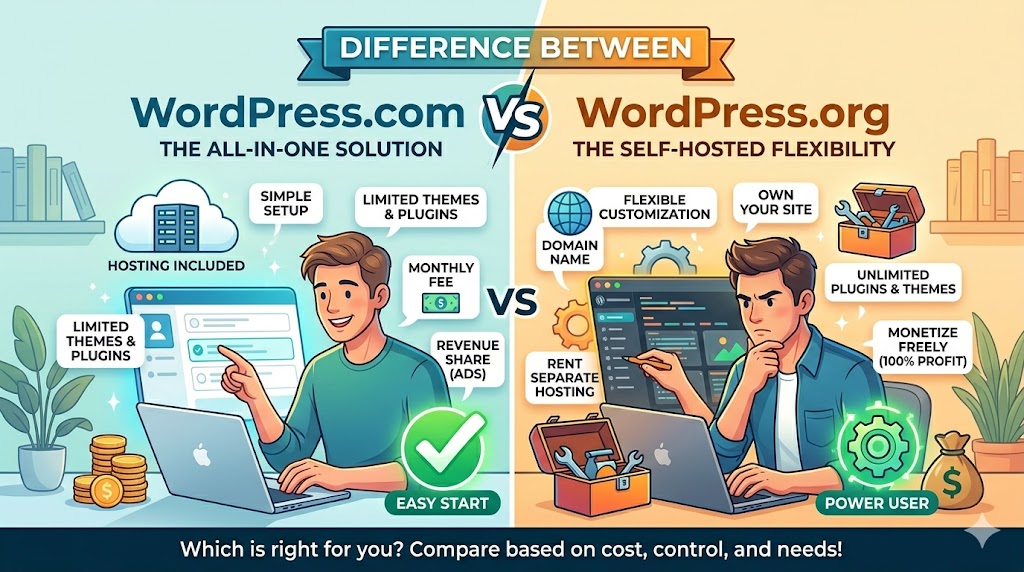
For beginners to WordPress, one of the most bewildering facts is that:
* In fact, there are two types of WordPress:
- WordPress.com
- WordPress.org
They sound alike, but are totally different. Making a mistake here will seriously hinder you from developing your blog later on.
In this basic guide, you’ll find out what the real difference is between WordPress.com and WordPress.org in terms of pricing, customization, hosting, SEO, plugins, etc.
What Is WordPress.com?
WordPress.com is a hosted website platform.
That means:
* Hosting, security, and maintenance are handled for you.
You simply:
- Create an account
- Choose a plan
- Start building your website
It’s designed for:
- Beginners
- Hobby blogs
- Simple websites
What Is WordPress.org?
WordPress.org is the self-hosted version of WordPress.
With WordPress.org:
- You manage your own hosting
- You control your website files
- You can install plugins and themes freely
* This gives far more flexibility and ownership.
The Biggest Difference: Hosting
WordPress.com = Hosted Solution
Everything is managed for you:
- Hosting
- Backups
- Security updates
- Maintenance
* Easier for beginners.
WordPress.org = Self-Hosted Platform
You choose:
- Hosting provider
- Themes
- Plugins
- Website configuration
* More control, but more responsibility.
Customization Differences
WordPress.com Has Restrictions
Depending on your plan, you may face limits like:
- Limited plugin access
- Restricted themes
- Less server-level control
* Lower-tier plans can feel restrictive quickly.
WordPress.org Offers Full Freedom
You can:
- Install any plugin
- Customize code
- Build advanced websites
- Optimize performance fully
* Ideal for businesses and developers.
Plugin & Theme Access
WordPress.com
Some plans limit:
- Plugin installation
- Advanced customization
* You often need premium plans for more flexibility.
WordPress.org
You can install:
- SEO plugins
- Security tools
- Custom themes
- Page builders
Example plugin installation:
Plugins → Add New → Install → Activate
* Much more scalable long term.
SEO Differences
WordPress.com SEO
Basic SEO features are included.
But advanced SEO control may require higher-tier plans.
Possible limitations:
- Limited plugin access
- Less technical SEO flexibility
WordPress.org SEO
You get complete SEO control.
You can:
- Install SEO plugins
- Customize schema
- Improve Core Web Vitals
- Optimize server performance
* Better for serious SEO growth.
eCommerce Differences
WordPress.com
eCommerce features depend heavily on your subscription plan.
* Some plans charge transaction fees or limit flexibility.
WordPress.org
You can fully customize online stores using:
- WooCommerce
- Custom payment systems
- Advanced integrations
* Better for scaling businesses.
Which Platform Is Easier for Beginners?
WordPress.com Wins Simplicity
If you want:
- Quick setup
- Minimal maintenance
- Simple blogging
* WordPress.com is easier initially.
WordPress.org Requires More Learning
You’ll need to understand:
- Hosting
- Backups
- Security
- Updates
* But the flexibility is worth it for many users.
Real-World Example
Beginner Blogger
Best Option:
WordPress.com
Why?
- Simpler setup
- Less maintenance
- Easy publishing
Growing Business Website
Best Option:
WordPress.org
Why?
- Better SEO flexibility
- Plugin freedom
- Full ownership
* Most professional websites use WordPress.org.
Common Beginner Mistakes
a. Choosing WordPress.com for a Growing Business
Many users outgrow the platform restrictions later.
b. Thinking WordPress.org Is “Hard”
Modern hosting providers make setup much easier now.
c. Ignoring Long-Term Scalability
Think beyond your first few months.
* Website growth changes your needs quickly.
Security & Maintenance Differences
WordPress.com Handles Maintenance
You don’t worry much about:
- Updates
- Security patches
- Server management
* Convenient for beginners.
WordPress.org Gives You Control
But you must manage:
- Backups
- Security plugins
- Hosting optimization
* More work—but more flexibility.
Performance Differences
WordPress.com
Performance optimization is partly controlled by the platform.
WordPress.org
You can optimize:
- Hosting
- CDN
- Caching
- Image compression
* Better performance potential overall.
Who Should Use WordPress.com?
Choose WordPress.com if:
- You want simplicity
- You don’t need advanced customization
- You’re building a personal site or hobby blog
Who Should Use WordPress.org?
Choose WordPress.org if:
- You run a business
- You care about SEO growth
- You need plugin flexibility
- You want complete ownership
* This is the preferred choice for most serious websites.
FAQ
Is WordPress.org free?
Yes, the software is free, but you still pay for hosting and domain registration.
Can I move from WordPress.com to WordPress.org later?
Yes, but migration can take extra work depending on your setup.
Which version is better for SEO?
WordPress.org offers more advanced SEO flexibility and control.
Summary
The difference between WordPress.com and WordPress.org comes down to one thing:
* Simplicity vs Control.
WordPress.com:
- Easier for beginners
- Less maintenance
- More restrictions
WordPress.org:
- More flexibility
- Better scalability
- Full ownership
* The best option depends on your long-term goals.
What Should You Do Next? (CTA)
Before choosing a platform, ask yourself:
- How much customization do I need?
- Do I want full website ownership?
- Will my website grow over time?
👉 If you’re building a serious business website, investing in WordPress.org early usually saves headaches later.




