Today’s modern website requires fast performance, flexibility, and an easy user experience across a variety of platforms including web browsers, mobile devices, and other internet of things (IoT) components. Traditional content management systems tend to miss the mark on supporting these rapidly changing requirements.
This is where Headless WordPress comes into play.
This guide will provide information about Headless WordPress, what makes it so powerful and how you as a developer, business owner or digital marketer can benefit from going headless in 2026.
What is Headless WordPress?
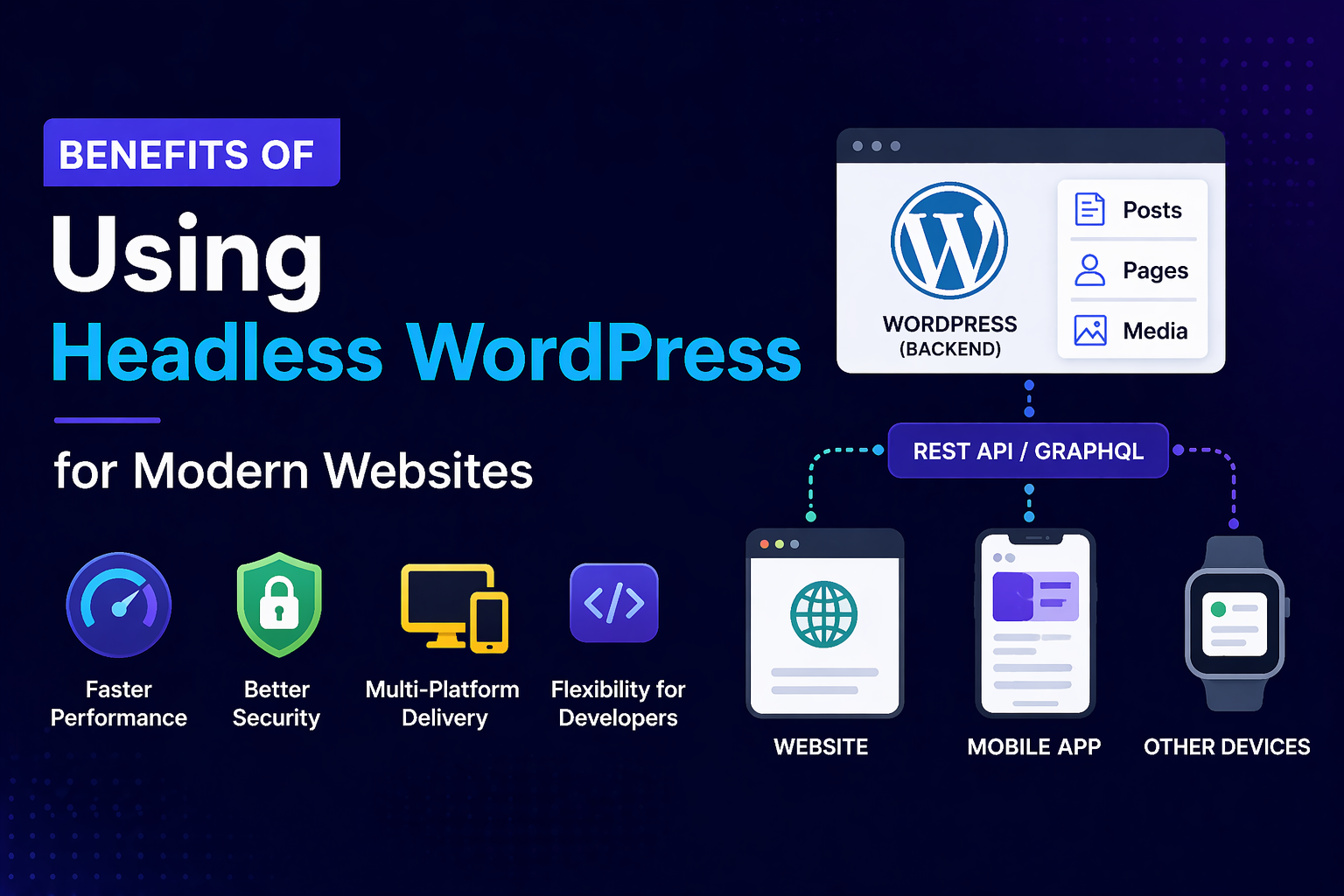
Headless WordPress refers to using WordPress solely as a back end (CMS) and decoupling the front end (UI) from the back end, allowing you to use any technology, including React, Next.js, or Vue.js.
Traditional WordPress:
- Back End + Front End tightly connected
- Uses Themes for UI
Headless WordPress:
- Back End = WordPress
- Front End = Any modern framework
- Connection is via API (REST/GraphQL)
In short, WordPress will manage your content, and the front end will display it.
How Does Headless WordPress Work?
Here is the basic flow:
- Submitting content from the WordPress Admin Panel
- Exposure of Data via API (REST/GraphQL)
- Fetch and render front end view using previously exposed data
Example API Endpoint:
https://yourwebsite.com/wp-json/wp/v2/posts
Example Fetch in Next.js:
async function getPosts() {
const res = await fetch('https://yourwebsite.com/wp-json/wp/v2/posts');
return res.json();
}
1. Quick and Efficient Performance
Performance is very important for SEO and providing a good user experience.
What Makes Headless Faster?
Through the use of
- Static Site Generation (SSG)
- CDN-friendly architecture
- Less server load.
You have the option to pre-render pages in frameworks like Next.js and serve them immediately.
Result: Reduced Loading Times and Improved Core Web Vitals
2. Increased Security
Traditional WordPress implementations are susceptible to attack for two reasons:
- Frontend and Backend are visible at the same time
- Weaknesses caused by the use of Plugins
Headless WordPress does the following:
- Hides the backend from public access
- Does not provide direct access to themes or plugins
Reduced number of way attackers can get into your system.
3. Flexibility for Frontend Development
You no longer need to develop frontend applications with PHP.
You now have many various frontend technologies available to you:
- React
- Angular
- Vue.js
- Static Site Generators
Example of a React Component:
function Post({ title, content }) {
return (
<div>
<h1>{title}</h1>
<div dangerouslySetInnerHTML={{__html: content}} />
</div>
);
}
Completely gives developers creative freedom when developing applications.
4. Multi-Platform Delivery of Content
Headless WordPress enables you to deliver content over the following platforms:
- Websites
- Mobile Apps
- Connected Devices
- Digital Kiosks
One Backend ->->Many Frontends
Ideal for businesses who have to produce content and distribute it across many platforms.
5. Enhanced Scalability for Your Application
As your application grows it becomes easier to scale your application.
Benefits to scaling:
- Ability to Scale Frontend and Backend Independently
- Ability to Handle Large Amounts of Traffic
- Ability to Take Advantage of Cloud-Based Infrastructure
Great for Enterprise Grade Applications.
6. SEO Benefits
Headless systems significantly benefit from improved SEO.
How:
- Fast Load Times
- SSR (Server Side Rendering)
- Customizable Meta Information
Example Meta Information in Next.js:
export const metadata = {
title: 'Blog Title',
description: 'SEO Optimized Description',
};
Improved Search Engine Ranking/Visibility.
7. Future-Proof Infrastructure
Technology progresses quickly. The use of a headless architecture ensures that you will:
- Have easy upgrades
- Not be locked into one WordPress Theme
- Be able to change your front-end Design when you want
Your website will remain up to date and flexible.
8. Cleaner Development Process
When using a headless WordPress, there will be more clear lines of separation of duty.
Back End team
- Will manage the content for the site through the WordPress Dashboard
- Use of WordPress Dashboard only
Front End team
- Will build the actual user interface for the customer, using a modern day framework such as React
- Will only use Next.js
This provides higher levels of collaboration and productivity.
9. API First
Using headless WordPress enables the creation of an API driven development environment.
Benefits:
- Easy Integrations
- Integrate with 3rd Party Service Providers
- Works with Micro-service architectures
This enables you to connect to multiple CRMs, Analytics, and more.
10. Real Life Scenario
A company wishes to create:
- A Website (Next.js)
- A Mobile App (React Native)
- Admin Panel (WordPress)
The content can simply be shared seamlessly across all three platforms using headless WordPress.
When should you use headless WordPress?
Consider using it for:
- High performance
- Modern UI frameworks
- Content management across multiple platforms
- Scalability
Not recommended for:
- Setting up a simple blog or website quickly
- No frontend development resources available
Quick Start Guide
Step 1: Install WordPress
Follow standard instructions for installing WordPress
Step 2: Enable REST API
You’ll find that it is already enabled
Step 3: Choose Front End Framework
This could be Next.js as an example
Step 4: Fetch Data
fetch('https://your-site.com/wp-json/wp/v2/posts')
Step 5: Deployment
Backend = Hosting Server
Frontend = Vercel (or similar)
Common Challenges (and solutions)
1. Learning Curve
Start with a simple project first
2. Compatibility with Plugins
Use an “API Friendly” plugin
3. SEO Setup Complexity
Use an SSR framework like Next.js
Headless WordPress is an effective solution to use when developing websites today that gives you more ways to develop your site, allows for improved performance and security, allows you to deliver content across multiple platforms, and allows you to use modern development techniques.
Key Takeaways:
- Decouples Front End from Back End
- Improves Performance and Security
- Able to Deliver Content Across Multiple Platforms
- Ability to Use Modern Development Techniques
Would you like to develop your website in a Headless format, then:
- Take a small website and convert it over to Headless
- Try integrating your WordPress site with Next.js
- Experiment with API’s and rendering dynamic content